Add an optional intro or outro on either side. Choose a part, or swipe the preview, to edit it.
Choose Verse or Prayer to begin.
Preparing your preview
Setting up sound…
Playback starts when the voice and scene are ready.
The first voice setup can take a little longer.
INTRO CARD · OPTIONAL
Set the opening mood.
Make this moment yours
Your template is ready. Personalize any line, then play the card to see it in motion.
Set the scene
Your file is a visual backdrop. The film uses the sound chosen in Narration.
Shape the presentation
Typography shortcuts
A coordinated font, color, text effect, and gentle camera movement. Advanced lets you adjust each part.
Font & size
Placement & spacing
Color & text effects
Keep the movement gentle
The full message stays visible while editing. Play this card to see the motion and fades.
A brief moment, or a little longer
Fades fit within the card length. Verse narration begins with the verse, after the intro.
Content
Loading your Bible verses…
Matching verses appear below as you type. Tap one to choose it.
Choose a chapter, then tap a verse below.
A prayer for…
Find a complete thought, read it in context, then choose the sentences for your video.
- 1 · Find
- 2 · Read & choose
- 3 · Use in video
Browse all 11 main-text chapters (pages 1–164). Step and theme links are editorial discovery guides.
READ & CHOOSE · PREVIEW
Only the highlighted passage will appear in your video.
Read the full chapter for context
Reading context only. Use the sentence controls above to change your video passage.
A look you like
Fine-tune the decoration
Classic look · gentle fade
Your message & wording
Keep the original wording, or enable editing to use your own words.
Edited wording is labeled Custom text. Pick a Bible verse again to restore the original KJV.
Font & size
Placement & spacing
Color & text effects
How your words appear
Preview plays this animation. Your finished video uses the same settings.
Background
Choose a scene
Use your own video
Your uploads stay on this device for this session.
Uploaded videos also appear in Scenes, so you can switch between them.
Animated backgrounds
Choose a gently moving background instead of a video clip.
Keep the text easy to read
Darken the scene behind the text without changing the video itself.
Loading beach scenes…
Narration
Read the text aloud
Natural voice · free
Sound beneath your verse
Shape & length
With narration, the video automatically lasts long enough to hear the verse and reference.
Playback starts when your selected voice and scene are ready.
Share
Your finished video
Choose Create video below the preview. Keep this tab visible until it finishes.
Add a little encouragement
Share from your iPhone · free
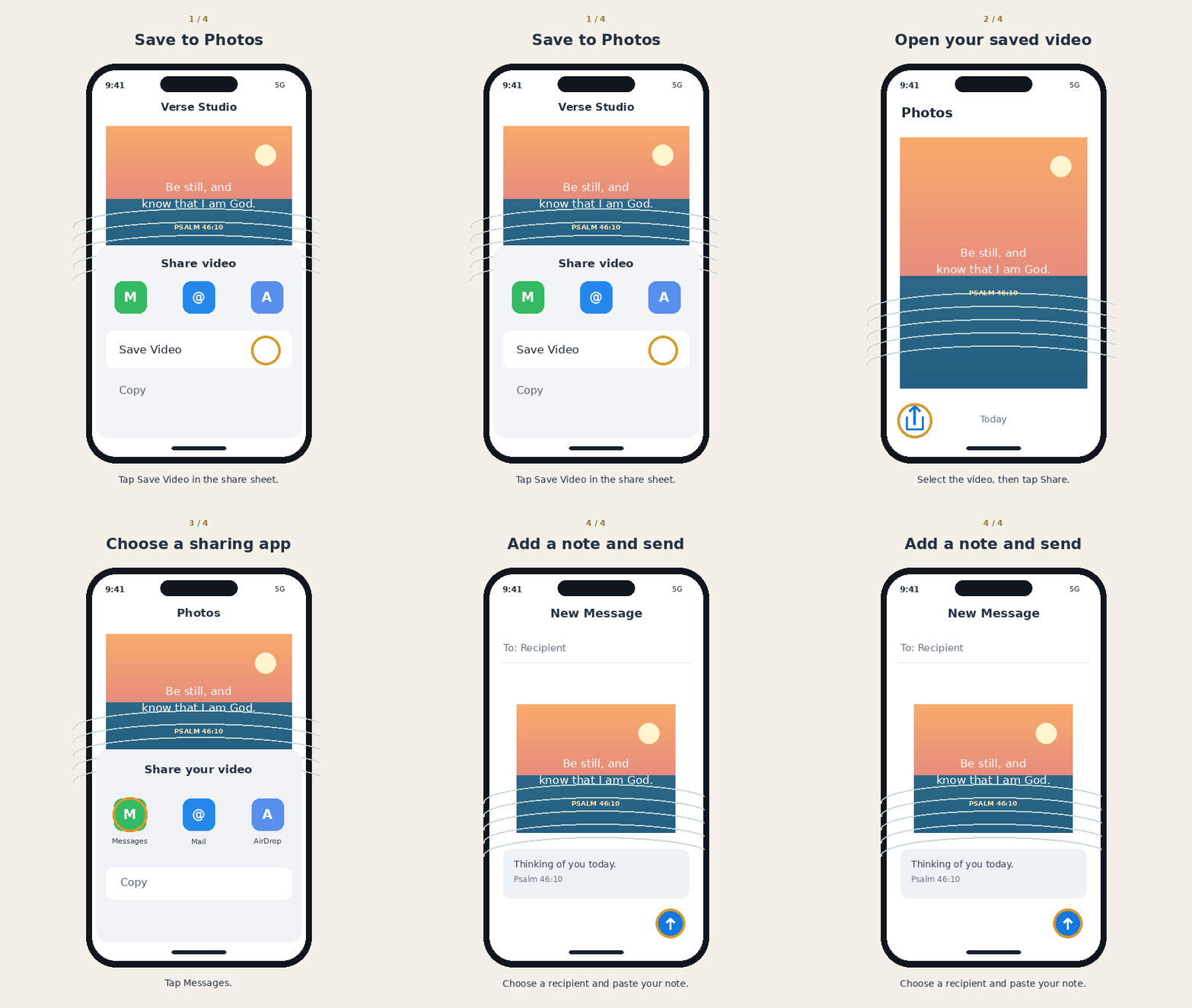
Prefer WhatsApp, AirDrop, or another app? Choose it in the same Photos share sheet. Large videos may need your app’s cloud link option.